
Pre-leasing for New Rental Buildings
Build Demand Before the Building Is Ready
Start a waitlist before the building opens, and use it to set rents and fill your first tours.
Waitlist
Start a Waitlist Early
Prospects join from a signup link on your website, listings, or signage
- Each person gives their name, email, phone number, unit type, and budget
- See the marketing channel each person came from

Demand
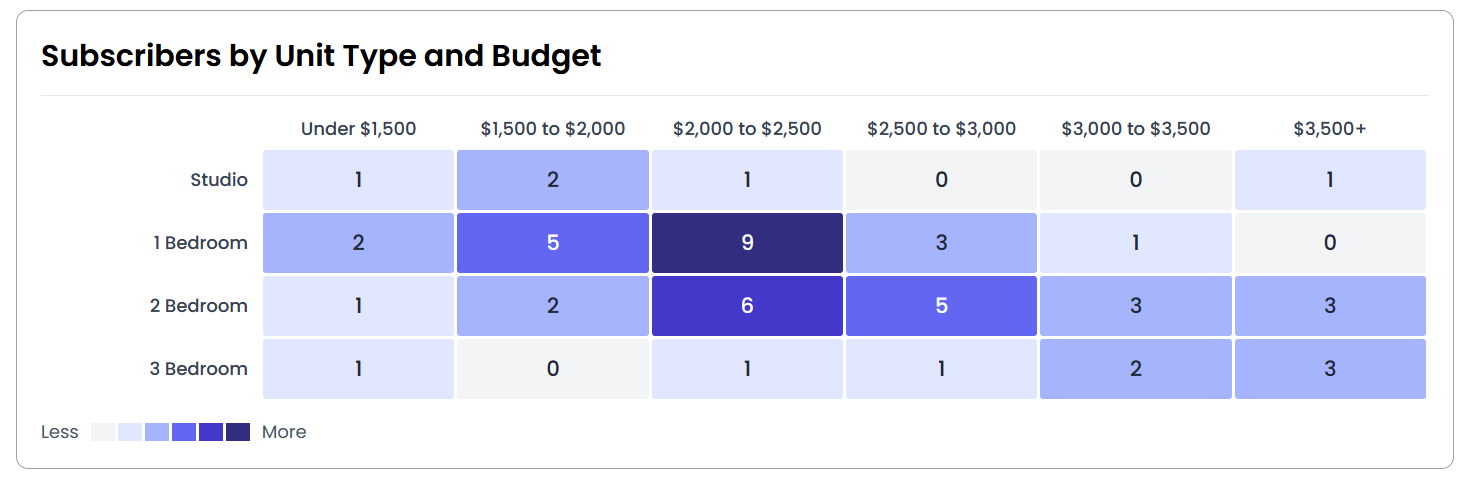
See Demand by Unit Type and Budget
Use the number of people who want each unit type, and what they can pay, to set rents
- See subscribers by unit type, budget, or both
- Track how fast the waitlist grows
Email Marketing
Email Your Waitlist
Send email campaigns to the whole waitlist, or only the people who chose certain unit types and budgets
- See the open rate and click rate for every campaign
- See which links were clicked in each campaign
- See each subscriber's email activity

Tours
Book Tours From Your Emails
When you start tours, add a Book a Tour button to your emails
- Each tour is recorded under the Email marketing channel in Analytics
- See which campaigns lead to tours

Next Stage
Lease-up Properties
Prospects book their own tours, confirmations and reminders send automatically, and every tour is tracked through to the lease.
Ready to Improve Your Leasing Results?
Book a demo to see what Rent IQ can do for your portfolio.